English
 Español
 Français
 China
China

How to Fix Misregistration on Paper Cup Fan Roll Die Punching Machine with Inline Flexo
You’re running paper cup fans through an inline flexo printer and roll die punch. The first few hundred fans look perfect—print centered in the cut, edges clean. Then you notice it. The print is drifting. By the end of the roll, the pattern is half a millimeter off the cut line. Every fan from that point is scrap.
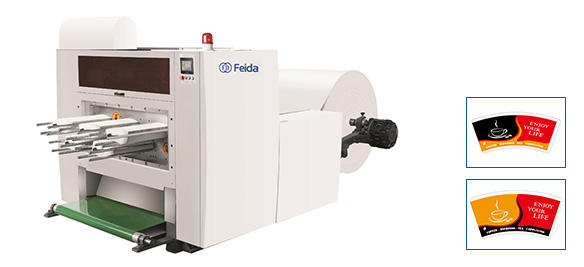
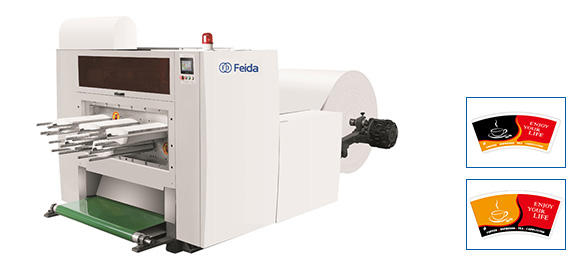
Print-to-cut misregistration on a roll die punching machine is one of the most frustrating problems in cup fan production. The machine is running at speed—up to 380 punches per minute on Feida’s FDYC series. The inline flexo printer and die punch are mechanically linked, but when registration drifts, the cause is rarely obvious. This guide walks through the three most common root causes—web tension, sensor issues, and mechanical backlash—and gives you a logical troubleshooting sequence that doesn’t rely on guesswork. The Feida FDYC series roll die punching machine with inline flexo printer is based on international advanced technology, widely used in paper cup, paper bowl, and paper plate production. But even advanced equipment needs systematic diagnosis when registration goes wrong.
The tension connection — how web tension affects print position
Web tension is the most common cause of registration drift—and the most overlooked. Paper stretches under tension, and when tension changes, the print position changes with it.
How tension spikes stretch the paper web
Paper is not rigid. Under tension, it elongates. A spike in tension—from a splice passing through, a roll that’s out of round, or a sudden speed change—stretches the web between the printing unit and the die punch. The print that was applied a meter upstream now arrives at the die punch slightly later than expected. The result: the cut is in the wrong place relative to the print.
The effect is cumulative. A 0.1% stretch over a 1-meter distance creates a 1mm registration error. At 380 punches per minute, that error appears in seconds. Higher tension also leads to stretching, neck-in, and registration drift; lower tension causes wrinkles, wandering web, and poor winding.
Using a dancer roller to stabilize tension
The solution to tension-related drift is consistent tension control. A dancer roller—a pivoting roller that moves to absorb tension fluctuations—is the most effective way to stabilize web tension on a roll-fed line. The dancer arm should move freely through its range, with no sticking or binding. If the dancer is frozen or sluggish, tension spikes pass straight through to the printing and punching stations.
Check: With the machine stopped, push the dancer roller through its full range of motion. It should move smoothly with even resistance. If it sticks, clean the pivot bearings and check the air pressure on the tension cylinder.
Sensor and encoder issues — when the machine loses the mark
The registration system relies on a sensor reading a mark printed on the web. If the sensor can’t read the mark reliably, registration drifts.
Cleaning the registration mark sensor
The most common sensor issue is simple: dirt. Paper dust, ink mist, and static-attracted debris accumulate on the sensor lens. A partially obscured sensor misses marks intermittently—the machine loses registration for a few cycles, then finds it again. The result is a batch of fans with inconsistent registration.
Fix: With the machine stopped and locked out, wipe the sensor lens with a lint-free cloth and isopropyl alcohol. Check the sensor’s alignment with the web—the mark should pass directly under the sensor’s field of view. If the web has shifted sideways, the sensor may be reading the edge of the mark instead of the center.
Checking encoder coupling on the die cylinder
The encoder tells the control system where the die cylinder is in its rotation. If the encoder coupling is loose, the control system thinks the die is in one position when it’s actually in another. The result is a consistent registration error that doesn’t drift—it’s just always off by the same amount.
Check: With the machine stopped, mark the coupling with a permanent marker and try to rotate the encoder shaft by hand relative to the die cylinder shaft. Any play indicates a loose coupling. Tighten the coupling set screws or replace the coupling if worn.
Mechanical backlash in the die cutting unit
Mechanical backlash is the hidden cause of registration errors that appear only at high speed. At low speed, everything aligns. At production speed, the backlash creates a dynamic error.
Wear of gearboxes or timing belts
The die cylinder is driven through a gearbox or timing belt from the main drive. Over time, gear teeth wear and timing belts stretch. The result is backlash—a small amount of free play in the drive train. At low speed, the backlash is taken up before the cut. At high speed, the inertia of the die cylinder causes it to lag behind the drive, creating a registration error that increases with speed.
How to test backlash with a dial indicator
Mount a dial indicator against the die cylinder. Rotate the cylinder in the direction of travel until it stops, then reverse direction slightly. The amount of movement before the indicator moves is the backlash.
Acceptable limit: For a high-speed roll die punching machine, backlash should be less than 0.10mm. If you measure more than 0.20mm, the gearbox or timing belt needs attention. Feida’s FDYC series uses high-quality imported components to minimize backlash, but even the best components wear over time.
A logical troubleshooting sequence
When registration drifts, don’t change everything at once. Follow this logical sequence to isolate the cause.
Start with a slow speed test
Run the machine at 50% of normal speed. If the registration error disappears at low speed, the problem is speed-dependent—likely mechanical backlash or tension dynamics. If the error persists at low speed, the problem is in the sensor, encoder, or setup.
Compare print register on first vs last fan of a roll
Pull the first fan from a roll and the last fan from the same roll. Place them side by side. If the registration is the same on both, the drift is consistent—likely a setup issue or sensor alignment. If the registration has shifted progressively from first to last, the problem is tension-related—the web stretched during the run.
Swap the flexo plate cylinder to rule out plate mounting error
If you suspect the printing plate itself, swap the plate cylinder with a known-good cylinder from another job. If the registration error moves with the cylinder, the problem is in the plate mounting. If the error stays with the machine, the problem is in the machine—tension, sensor, or backlash.
Below is a quick reference table for registration error patterns and likely causes:
| Error Pattern | Most Likely Cause | Check First |
|---|---|---|
| Error is consistent (always off by same amount) | Sensor alignment or encoder coupling | Clean sensor; check coupling play |
| Error increases from start to end of roll | Web tension drift | Check dancer roller movement; inspect roll roundness |
| Error appears only at high speed | Mechanical backlash | Measure backlash with dial indicator |
| Error is intermittent (comes and goes) | Dirty sensor or loose connection | Clean sensor lens; check wiring |
| Error is worse on one side of the web | Uneven web tension (side-to-side) | Check web alignment through rollers |
Questions from cup manufacturers
Q: Can different paper reels cause sudden misregistration?
A: Yes—and this is more common than operators realize. A paper reel that isn’t perfectly round causes tension pulses as the paper unwinds. Each revolution of the out‑of‑round roll creates a tension spike that stretches the web and shifts registration. Check roll roundness with a dial indicator on the unwinding shaft. Variation should be less than 2mm. If a roll is significantly out of round, slow the unwinding speed or replace the roll.
Q: Why does misregistration only happen above 250 cups/min?
A: This is the classic symptom of mechanical backlash or dynamic resonance. At speeds below 250 cuts/min, the drive train has time to take up the backlash before the cut. Above 250, the die cylinder’s inertia causes it to lag, and the backlash creates a registration error. The fix is to reduce backlash—tighten timing belts, replace worn gears, or adjust the drive train preload. Some machines have an adjustable backlash compensation in the control system; check your machine’s parameters.
Q: Should I recalibrate after every die change?
A: Yes—and this is a common point of failure. Each die has slightly different mass and inertia. When you change the die, the dynamic behavior of the die cylinder changes. Run a registration check at production speed after every die change. Most machines have a calibration routine that takes less than two minutes. Skipping it is the fastest way to start a shift with misregistered fans.
When to inspect the main drive shaft key
This is a rare but serious cause of registration error. The main drive shaft connects the motor to the die cylinder through a key. If the key shears or wears, the die cylinder loses its fixed relationship to the drive. The result is a registration error that appears suddenly and doesn’t respond to any adjustment.
Symptom: Registration error that appears without warning, after the machine was running correctly. No tension change, no sensor issue, no speed change. The error is consistent but not adjustable.
Fix: Stop the machine, lock it out, and inspect the drive shaft key. If the key is sheared or worn, replace it. This is a low-cost repair that solves a problem that otherwise looks like a control system failure.
Operator summary checklist
Before you call for service, run through this checklist. It takes 15 minutes and catches 80% of registration problems.
-
Sensor lens clean? Wipe with isopropyl alcohol.
-
Dancer roller moving freely? Push through full range.
-
Web tension stable? Watch the tension display for fluctuations.
-
Roll roundness within spec? Check with dial indicator on unwind.
-
Backlash measured? Should be <0.10mm.
-
Encoder coupling tight? No play between encoder and die shaft.
-
Calibration run after last die change? If not, run it now.
-
Plate cylinder mounting secure? No movement when twisted by hand.
Feida Machinery‘s FDYC series roll die punching machine with inline flexo printer is designed for high-speed production of paper cup fans, paper bowl blanks, and paper plates. Cutting precision is ±0.20mm, production capacity ranges from 280 to 380 punches per minute, and the machine handles paper thickness from 150 to 400 gsm. With high-quality imported components, an intuitive touch screen interface, and precise hydraulic control, the FDYC series is built for reliability. But even the most reliable machine needs operators who know how to diagnose registration drift when it appears.
Struggling with registration drift on your roll die punching line? Contact Feida Machinery for technical support or product information. Share your machine model (FDYC series or other), current speed, paper weight, and the pattern of registration error—their team can help identify the root cause and recommend corrective actions.